What Is ChatPDF? What Are Its Features?
Explore what ChatPDF is, its key features, pricing, and free usage limits, and how to chat with PDF files to summarize, translate, and analyze documents.



ChatPDF is an SI tool that lets you analyze text quickly and effectively. By exploring the information in PDF files in a chat-style format, it boosts your productivity and saves you time.
What is ChatPDF?


ChatPDF is an innovative SI tool that makes it easy for users to interact with PDF files. The tool rapidly analyzes the content of the PDFs you upload, provides summaries, and helps you get answers to any questions you have about the file. It saves time especially with long, complex documents by helping you find the important information fast.
ChatPDF is a major convenience for individual users and professionals alike. You can work with many types of PDFs, from academic papers and business reports to e-books and technical documentation. The tool offers features such as text analysis, highlighting of key points, and specific answers to your questions.
Thanks to its interactive structure, you can review a PDF file as if you were chatting with an assistant and reach the details with ease. ChatPDF is an ideal solution for improving efficiency in document management and information access.
What are ChatPDF's features?


- The Multi-File Chats feature is a major convenience, particularly for users working with multiple documents. It lets you combine different PDF files into a single chat and work in an organized way. You can work more efficiently on your study materials, academic papers, or project files. Instead of reviewing each file separately, you can see all your documents together and access them from the same chat.
- The Summarize PDFs feature is an SI solution that saves time when dealing with long, detailed documents. Summarizing academic papers, research reports, or business documents is now far easier. It removes the need to read entire documents, letting you reach the core insights quickly. Especially when working on information-dense files, it lets you analyze fast without missing the critical points. This feature is highly valuable for professionals and students who want to streamline their workflows and improve productivity.
- The Translate PDFs feature converts any PDF file into the language of your choice. It turns documents from around the world into clear, readable text you can understand instantly. It breaks down language barriers and makes content in different languages easily accessible.
- The Side-by-Side View feature lets you keep the chat and the PDF file open at the same time. Answers are linked back to the original PDF content, making verification and further research easier. This feature saves time in research and analysis workflows while helping you reach information more efficiently.
How to use ChatPDF


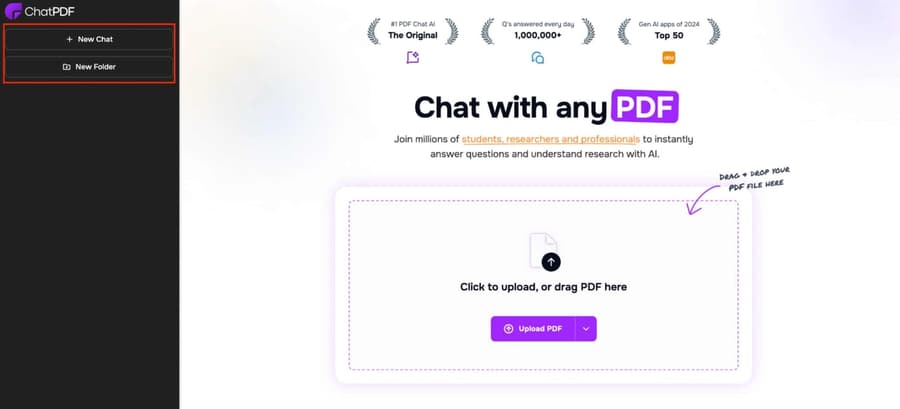
ChatPDF has a user-friendly and remarkably simple interface. Using the Upload PDF button, you can easily upload the PDF file you want and start working right away. Uploading takes only a few seconds, so you can begin processing the document quickly.
The New Chat option lets you create a separate chat for each new PDF file. This keeps things organized while you work on multiple documents at once. For example, you can organize PDFs belonging to different projects or topics into separate chats and avoid confusion.
The New Folder feature lets you sort your uploaded PDF files into categories and group them under a specific folder. This is a major convenience, particularly for users working with a large number of files. You can organize your PDFs by topic, project, or work area and quickly access the file you need.
These ChatPDF features simplify document management, save you time, and create a more productive working environment.
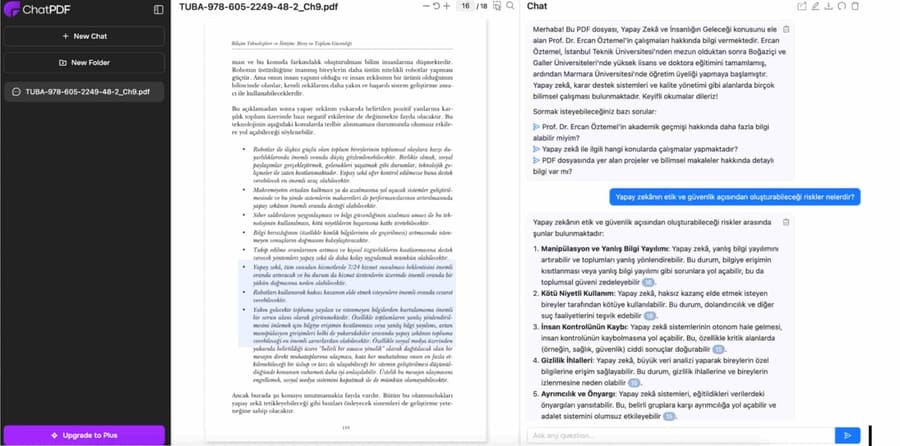
When you upload a PDF file to ChatPDF, the system automatically analyzes the file's content and presents you with a short summary. This summary helps you quickly grasp the document's core content and key points. When working with long, detailed documents in particular, the summarization feature helps you rapidly understand the overall structure and focal points of the document.
After sharing the summary, the tool kicks off the interaction by suggesting alternative questions. For example, it guides you with prompts such as "What is the main topic of this file?", "What are the most important points in this document?", or "Which sections should I read?". This feature is especially useful for users who are unsure where to start with a document.
Beyond that, you are completely free to ask your own questions. For example, you can request a detailed explanation of a specific paragraph, ask about a particular term or concept, or raise questions about any detail in the document. Because the system answers your questions based on the PDF's content, it always provides relevant and accurate information.
What are ChatPDF's usage limits?


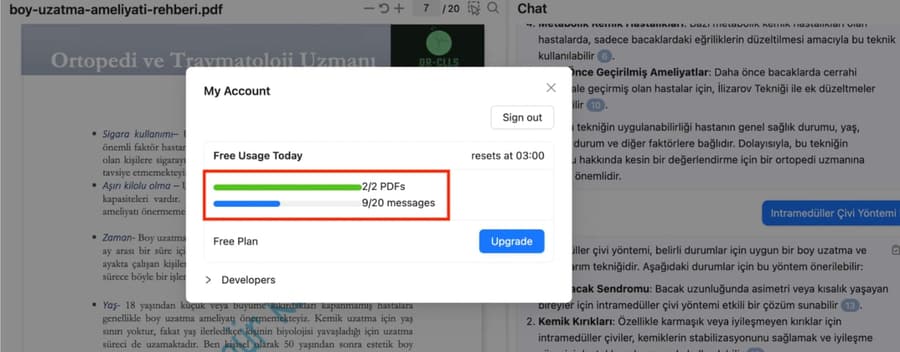
The free tier of the tool allows you to review 2 PDFs per day. On top of that, it grants 20 messages per day. You can view your remaining usage allowance in your profile.
ChatPDF pricing
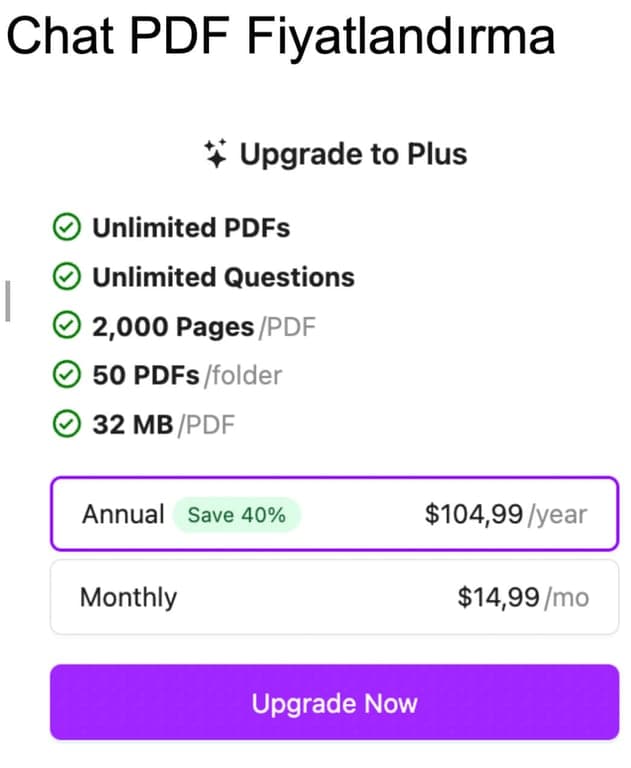
ChatPDF's Plus plan lets users manage their documents more effectively with unlimited PDFs and unlimited questions. The plan supports 2,000 pages per PDF, up to 50 PDFs in a single folder, and a maximum file size of 32 MB.
The annual subscription costs $104.99, which comes with a 40% saving. The monthly option is priced at $14.99. The Plus plan is an affordable, flexible solution for individuals and professionals with heavy PDF workloads.
What are ChatPDF's advantages?
ChatPDF streamlines your workflows with the advantages it offers. It saves time by quickly summarizing long documents, letting you reach the important information without getting lost in unnecessary detail. Thanks to its user-friendly interface, users at every level can work with the tool comfortably.
Another key advantage of ChatPDF is the interactive experience it delivers. It answers your questions by tying them directly to the PDF's content, so you get information with a high degree of accuracy. Multi-PDF and folder support also lets you manage your documents in an organized way. Its translation and side-by-side view features offer a distinctive solution for global users.
Who uses ChatPDF, and in which fields?
ChatPDF attracts broad interest across industries and user groups. Students and researchers working on academic projects frequently use the tool to summarize long papers and jump straight to the key points. Professionals use ChatPDF to work more efficiently on business reports and technical documents. Lawyers and consultants working with legal documents also rely on the tool to easily reach the information they need inside high-volume files.
E-book readers and authors also turn to ChatPDF for book summaries and content analysis. With its multi-language support, it offers an ideal solution for international collaboration and for users who want to understand documents in different languages.