What is NotebookLM? How to Use It?
NotebookLM is Google's source-grounded SI research assistant; it lets you generate summaries, explanations, study guides, briefings, mind maps, and audio content from the PDFs, web pages, YouTube videos, audio files, Google Docs, and Google Slides you upload.



NotebookLM is Google's source-grounded SI research assistant; it lets you generate summaries, explanations, study guides, briefings, mind maps, and audio content from the PDFs, web pages, YouTube videos, audio files, Google Docs, and Google Slides you upload.
In the digital world, organizing, interpreting, and repackaging information has become just as critical as producing it. For students, researchers, content teams, and professionals in particular, reading scattered sources one by one, taking notes, and drawing meaningful conclusions from them consumes serious time. NotebookLM, developed by Google, steps in at exactly this point.
Describing NotebookLM as just a note-taking tool would sell it short. Rather than passively storing the sources you upload, the tool acts as an SI research assistant that works on top of them. It interprets your documents, summarizes their key points, answers your questions based solely on those sources, and produces different output formats from the same pool of information.
In this article, we will cover what NotebookLM is, how it works, where it can be used, how to use it efficiently, and how its advantages and drawbacks balance out, all in its current form.
What is NotebookLM?


NotebookLM is an SI-powered research and study tool developed by Google. Its defining difference is that instead of generating answers from general internet knowledge, it works on the sources you upload. That makes NotebookLM a more controlled experience for document-based research, reporting, learning, analysis, and content production.
With conventional generative SI tools, the user typically asks the model a question and the model draws on its general knowledge to answer. In NotebookLM, your sources sit at the center. You upload a PDF, web page, YouTube video, audio file, Google Doc, or Google Slides deck, and NotebookLM interprets those materials to build a layer of knowledge that works for you.
In this respect, NotebookLM is positioned not as an SI that merely writes, but as an analysis and synthesis assistant that works from sources.
What are NotebookLM's purpose and features?
NotebookLM's core purpose is to make scattered information more accessible, more understandable, and more usable. It delivers a serious time advantage, especially for users working with large numbers of documents, notes, videos, or other sources.
Its standout features include:
- Source-grounded logic: NotebookLM answers based on the sources you upload. This makes it easier to preserve context, particularly in research and specialist topics.
- Inline citations: It ties its answers back to the relevant sources, a meaningful advantage for accuracy, transparency, and trust.
- Multi-source support: It supports different source types such as PDFs, websites, YouTube videos, audio files, Google Docs, and Google Slides.
- Multiple output formats: It can turn your sources into study guides, briefings, summary documents, mind maps, audio overviews, and video overviews.
- Multilingual use: NotebookLM supports more than 80 languages, including Turkish.
- Note taking and note conversion: You can add your own notes, save chat responses as notes, and later convert notes into new sources.
- Sharing and collaboration: Notebooks can be shared on eligible account types. Some sharing and public notebook features may vary by account type.
- Google ecosystem fit: It offers a practical workflow for users who already work with Google Docs and Google Slides.
This is exactly where NotebookLM's strength shows: it does not just store information, it processes it for you.
How does NotebookLM work?


NotebookLM generally follows this flow:
- First, you create a new notebook.
- You upload sources on a specific topic to that notebook.
- NotebookLM reads and interprets those sources.
- You can then generate summaries, ask questions, compare content, or produce output in different formats. Here is a brief outline of how to use it:
- First, you import your digital notes into NotebookLM or connect your existing Google Docs account. This brings all your information together in an organized way.
Where NotebookLM is used


NotebookLM has a remarkably wide range of uses. It is a powerful assistant, especially for users doing information-heavy work. Its value comes not from serving a single user group but from adapting to different needs.
NotebookLM for education and students
On the education side, NotebookLM offers a very strong use case. Lecture notes, articles, presentations, and assigned readings usually arrive in fragments. NotebookLM brings that fragmented material together in one place.
The main benefits it can offer students include:
- Gathering lecture notes in one place
- Producing quick summaries from long sources
- Preparing study guides before exams
- Simplifying complex concepts
- Cutting research time when preparing presentations or projects
- Running question-and-answer sessions over the sources
- In programs with heavy reading loads in particular, NotebookLM can save significant time.
NotebookLM for professionals
In business, fast access to information and an organized workflow matter enormously. NotebookLM can be a strong support tool for teams working with meeting notes, reports, briefs, strategy documents, and internal communication materials.
Areas that stand out in professional use:
- Organizing meeting notes
- Distilling long reports into short executive summaries
- Gathering research documents in one place
- Preparing content briefs
- Generating presentation flows
- Making working notes reusable later on
- Its practical value is especially high for content, marketing, strategy, and research teams.
Advantages for researchers and academics
One of NotebookLM's most natural use cases is research and academic work, because the tool makes it easier to evaluate multiple sources within a single context.
Its standout advantages in this area:
- Collecting research sources in one central place
- Evaluating multiple documents together
- Comparing by concept, argument, and theme
- Producing quick summaries
- Building study guides or topic outlines
- Setting up a more controlled, source-grounded question-and-answer flow
How to use NotebookLM


NotebookLM is easy to use, and you can start putting this powerful tool to work in a few simple steps. Here is a step-by-step guide to getting started and getting the most out of it:
1. Creating a NotebookLM account
The first step is to create an account or sign in with your existing Google account.
- Go to the NotebookLM homepage.
- Click the "Try NotebookLM" button and you will be directed to a page where you can sign in with your email account.
- Connect your existing Google account to complete the process.
This makes it easier to sync your notes and access your content in Google Docs.
2. Creating a notebook
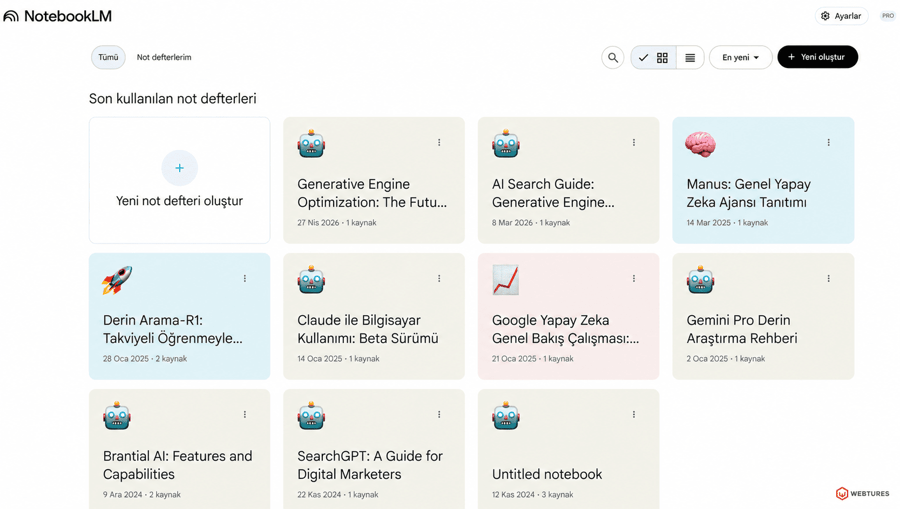
To start using NotebookLM, you first need to create a new notebook. Think of each notebook as a separate workspace for a specific topic, project, course, research effort, or content project. Creating separate notebooks for different topics keeps your sources better organized. According to Google, each notebook operates independently, and NotebookLM does not evaluate information across different notebooks at the same time.
2. Uploading sources
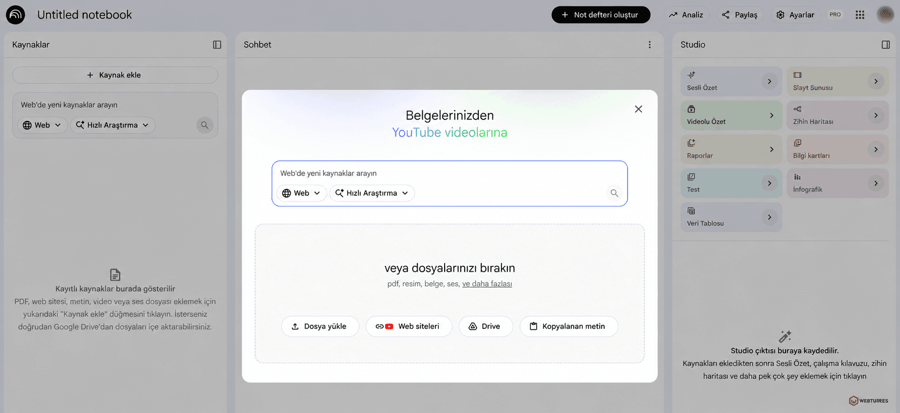
One of the most important steps when starting with NotebookLM is uploading the sources you want to work with. As the screenshot shows, the "Add source" screen lets you upload and organize your information easily. This is where you supply the foundational material NotebookLM needs to generate the most accurate answers for you.
- File upload: You can upload supported file types such as PDF, TXT, and Markdown here. Drag and drop your document or use the "choose file" button.
- Google Drive integration: You can easily access files in Drive, such as Google Docs and Google Slides.
- Adding links: You can add extra sources by integrating website or YouTube links you want to work with.
- Pasting text: If you want to use a specific piece of text quickly, paste it into this area.
Through these steps, NotebookLM analyzes the sources you upload and generates the most relevant answers and summaries for you. With the interface as a guide, users can get maximum value from the tool and keep their sources well organized.
Things to watch when uploading sources:
- Do not add off-topic content to the same notebook
- Where possible, weed out old and outdated sources
- Use fewer but stronger sources instead of many weak ones
- Do not pile up duplicate versions of the same content
Chat and source management areas
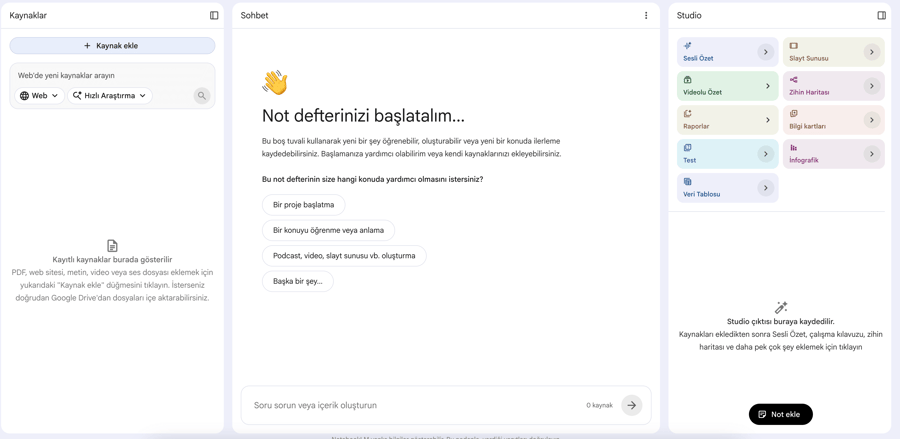
The chat panel is one of NotebookLM's most functional areas. Rather than asking simple questions, task-oriented prompts deliver better results.
For example, questions like these are far more productive:
- List the common themes across these sources.
- Turn this report into an executive summary.
- Identify the points where these sources disagree.
- Prepare a 7-point flow for a presentation.
- Explain this topic in simpler terms for a beginner.
On the source management side, these functions stand out:
- Viewing uploaded sources
- Selecting specific sources for more focused work
- Adding notes
- Saving chat responses as notes
- Converting notes into sources later
- Exporting notes to Google Docs or Google Sheets
The Studio panel is where NotebookLM truly sets itself apart. Here you can generate output from your sources in different formats.
Standout Studio outputs:
- Audio Overview
- Video Overview
- Study Guide
- Briefing
- Mind Map
- Notes
- In some scenarios, formats such as Flashcards, Quiz, Infographic, and Slide Deck
This structure turns NotebookLM from a mere reading tool into a production tool.
Advantages and disadvantages of NotebookLM
NotebookLM is a powerful tool, and like every powerful tool, it creates real value when used in the right place. That is why its advantages and limitations should be weighed together.
Advantages of NotebookLM
- Source-grounded operation: It offers more controlled context than general-purpose SI tools.
- Inline citations: It is easy to see which source each answer relies on.
- Time savings: It can extract meaningful summaries from long documents in a short time.
- Multiple output formats: A single pool of sources can power many kinds of output.
- A structure well suited to education and research: It is especially strong for document-heavy work.
- Multilingual support: Support for more than 80 languages allows more flexible use.
- Google ecosystem fit: It works naturally with content such as documents and slides.
Disadvantages of NotebookLM
- Dependence on source quality: Weak or disorganized sources produce weak output.
- Notebooks operate independently: Different notebooks cannot be combined into a single context.
- Some features vary by account type and device: Certain features may be limited in the mobile app or on work and school accounts.
- SI output still needs review: Verification remains necessary, especially for audio and video outputs.
- It does not replace final human judgment: It should not substitute for professional evaluation in fields such as medicine, law, or finance.
NotebookLM's weaknesses do not make it any less valuable; they simply show how it should be positioned.
Overall assessment of NotebookLM
NotebookLM is one of the most functional products among Google's SI tools, with one of the clearest use cases. While many generative SI experiences look like tools trying to do everything, NotebookLM focuses on a much more specific problem: working more efficiently with scattered information.
In this respect, NotebookLM creates a serious productivity layer for students, researchers, content teams, consultants, strategy teams, and information-intensive professionals. It is a strong assistant for long documents, learning materials, reports, presentation preparation, and content planning in particular.
Its most critical advantage is that it works from sources. In SI tools today, the real issue is not just speed but the need for trust, context, and control. NotebookLM balances all three better than many general-purpose SI tools.
In short, NotebookLM is not merely a note-taking tool; it is a working system that thinks with the information you upload, structures it, and makes it reusable. It is a strong choice for anyone who wants to use SI in a more controlled, transparent, and productive way.
To integrate SI tools like NotebookLM into your company's digital marketing strategy and professionalize your content production, get in touch with the Webtures team. You can also explore how GEO helps brands stand out in SI-powered search.