How to Grow Your LinkedIn Network in 5 Minutes a Day
Learn how to grow your LinkedIn network in just five minutes a day with a step-by-step plan covering invitations, messaging, content, and engagement.



Five minutes a day is enough to grow a LinkedIn network, provided those five minutes follow a fixed order rather than whatever the feed serves up. This article sets out a daily routine based on the current LinkedIn interface, the division of labour between a personal profile and a company page, the old tactics that no longer work, and the data that tells you whether the network is actually growing.
How do you build the five-minute daily routine?


The point of the routine is not to inflate a connection count but to build mutual visibility with the right people. Split the five minutes across three jobs: review pending invitations, send new invitations, leave one substantive comment on a post in your network. Done in the same order every day, network growth becomes measurable within a few weeks.
Targeting is the critical part. Hundreds of connections with no relevance to your sector fill your feed with content you cannot use and make it harder for your own posts to reach the people who matter. Our guide on defining your target audience gives you a framework for deciding who to pursue.
What do you do in the first five minutes?


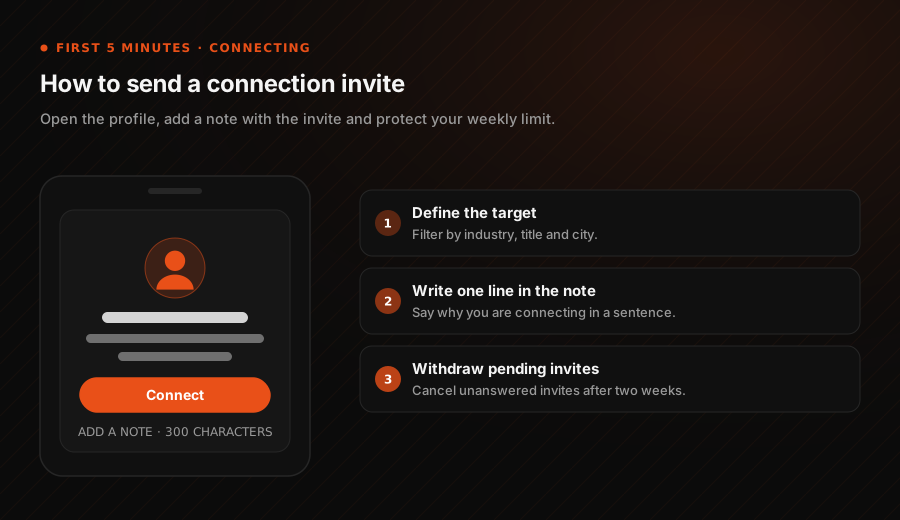
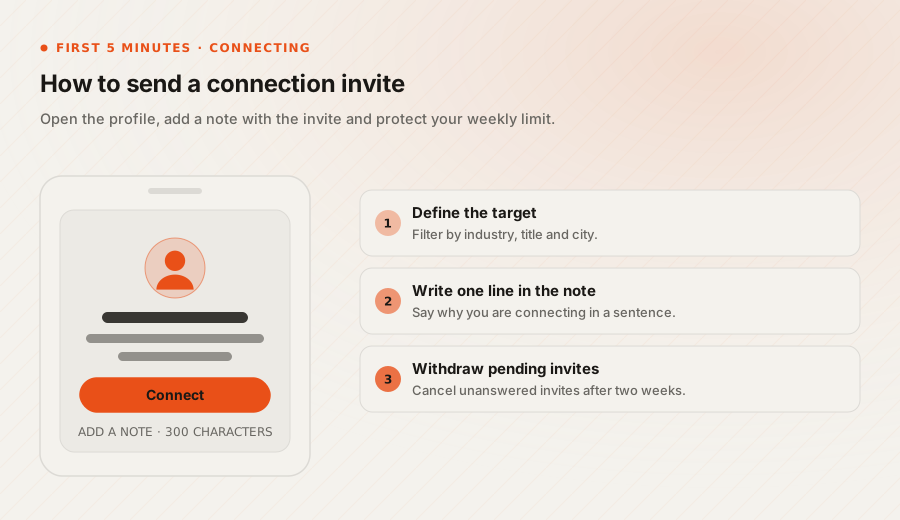
The first block goes to connection management. On the current interface the flow works like this.
- Review pending invitations. Open incoming invitations from the My Network tab. Before accepting, open the profile and check what the person does and where. Mutual connections tell you quickly whether the invitation is genuinely relevant.
- Add a short note to new invitations. The Add a note option appears when you send an invitation. The character limit is tight, so write one sentence: say why you want to connect, and do not pitch a service. Invitations without a note are accepted at a noticeably lower rate.
- Keep the daily invitation count low. LinkedIn applies a weekly invitation limit, and unaccepted invitations consume it. A handful of targeted invitations a day beats bulk sending.
- Clear out pending sent invitations. Withdraw the ones that have gone unanswered for weeks from the Sent list. It frees up your allowance.
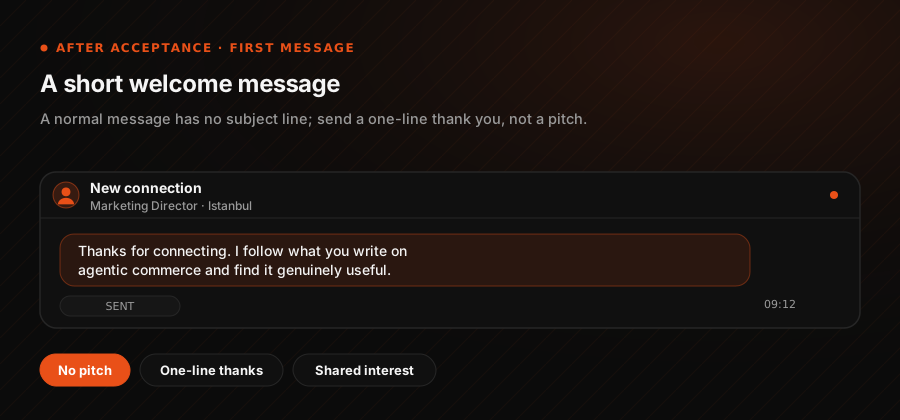
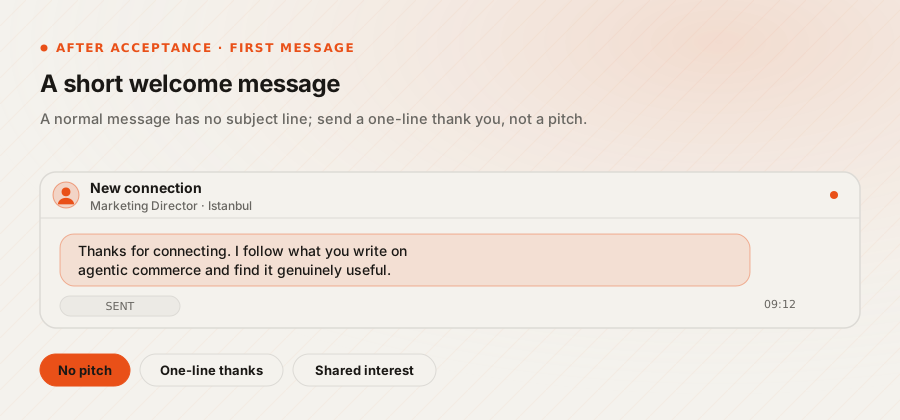
- Message accepted connections briefly. Regular messages have no subject line; you write straight into the message box. Do not open with an offer. One sentence of thanks and one line about a shared interest is enough.
How do you raise visibility in the second five minutes?


The second block goes to the work that makes your network see you. Connection count alone does not create visibility; engagement does.
- Check who viewed your profile. The analytics section on your profile lists profile views, post impressions and search appearances separately. Views from job titles relevant to your work are the best list you have for outbound invitations.
- Comment on a post in your network. One-word agreement adds nothing. A comment that contributes a sentence from your own experience gets you noticed by everyone who sees that post. For the same effort, commenting brings more new connections than posting does.
- Publish your own content. The post box on the home feed handles text, images and documents, and the article option covers longer pieces. If you publish regularly, the newsletter format makes reach more predictable, because subscribers are notified with every issue.
- Control profile update announcements. Before making a substantial profile change, check the setting that shares profile updates with your network. Turning it off for minor edits keeps you from spending your network's attention on nothing.
How should a personal profile and a company page differ?


A personal profile and a company page do different jobs and cannot run on the same routine. The profile generates reach; the page generates credibility and proof.
- Personal profile: Connecting, commenting and sharing expert opinion all run from here. In B2B, the interactions closest to a purchase decision happen on personal profiles. We covered the commercial framing in B2B versus B2C marketing.
- Company page: Corporate announcements, open roles, case studies and product updates belong here. Page admins can notify employees about a post, but that feature is rate limited and is not for every post.
- Division of labour: The page publishes, and team members reshare from their own profiles with their own commentary. A sentence written by each employee, rather than a copy-paste repost, is what carries the post into different networks.
- Management: Running several accounts by hand wastes time. Build a publishing calendar and agree who owns comments and replies before volume becomes a problem.
Which old tactics no longer work?
Most published advice about LinkedIn rests on features the platform removed years ago. Here is the current position.
- LinkedIn Today is gone. Editorial promotion now runs through LinkedIn News teams and the feed algorithm. There is no route for pitching content to an editorial inbox.
- Creator mode was retired. The features behind that toggle became the default for all accounts, so there is no mode left to switch on.
- Messages have no subject line. The subject field appears only in InMail. The old instruction to "write a title in the subject field" is obsolete.
- Bulk invitation strategies fail. The weekly limit and the build-up of unaccepted invitations stop volume-driven approaches quickly.
- Automation tools are a real risk. Third-party invitation and messaging bots breach the platform rules and can get an account restricted.
How do you measure network growth?
Network growth is measured by reach into the right audience, not by connection count. Checking four figures once a week is enough.
- Search appearances: Found in profile analytics, along with the job titles of the people searching. If your target titles are missing, your headline is positioned wrongly.
- Quality of profile views: The industry and seniority mix of viewers matters, not the total.
- Post impressions against engagement rate: High impressions with low comments means the content draws attention without earning a response.
- Company page follower sources: Page analytics show which channel followers arrive through, which is how you track the contribution of employee resharing.
How Webtures approaches it
Webtures runs LinkedIn work on two separate tracks, personal profiles and the company page. We start with a target title list, rewrite profile headlines in the search language those titles actually use, then separate the weekly publishing calendar from the daily engagement routine. Across 16 years of digital marketing work, one pattern holds: on LinkedIn, results are set by the precision of the connection list far more than by posting frequency.
To build a corporate LinkedIn presence on this model, talk to our team in Istanbul and London.