Effective Ways to Keep Visitors on Your Website
Keeping visitors on your site is the result of design, speed, content and navigation decisions working together.

Keeping visitors on your site is the result of design, speed, content and navigation decisions working together. A user decides whether to stay within the first few seconds of a page opening, and what settles that decision is not content quality but how quickly the page becomes usable. This article explains which metrics actually measure time on site, how Core Web Vitals thresholds affect retention, how to structure content and internal links, and which mistakes cost the most.
Why does time on site matter?
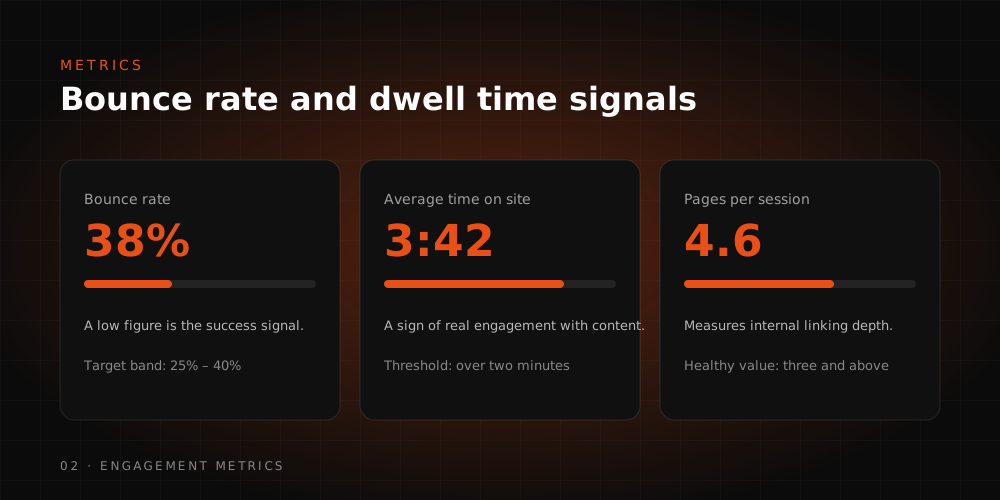
Time on site is not a ranking factor on its own; it is a signal of whether a user's need was met. When people find what they came for, they stay, move to a second page, complete a form or add a product to the basket. When they do not, they return to the results and click something else. The commercial effect appears here: more pageviews from the same traffic, more micro-conversions, more revenue.
That is why the goal should never be framed as "increase the time". A user spending a long time on an order tracking page is bad news. The right goal is to satisfy intent by the shortest route, then offer a relevant next step.
Which metrics measure it?
Google Analytics 4 dropped the old bounce rate model and built measurement around engagement instead. Reading the metrics correctly is what tells you which work to prioritise.
- Engaged session: GA4 counts a session as engaged if it lasts beyond a set threshold, includes more than one pageview, or contains a conversion event. Any one of those three conditions is enough.
- Engagement rate: Engaged sessions divided by total sessions. Bounce rate in GA4 is simply the inverse of this figure, so it is not a separate signal.
- Average engagement time: The time the tab spends in the foreground and active. Unlike the old session duration calculation, it does not count tabs left open in the background.
- Pages and events per session: Shows whether users genuinely move between your content or stop at the entry page.
- Scroll and site search events: Reveal where attention breaks down on a page. Internal search queries that return nothing are a ready-made list of the content you are missing.
All of this rests on the event schema. Interpretation without a proper schema is guesswork, and a broken schema produces confident but wrong conclusions.
How do speed and Core Web Vitals affect retention?
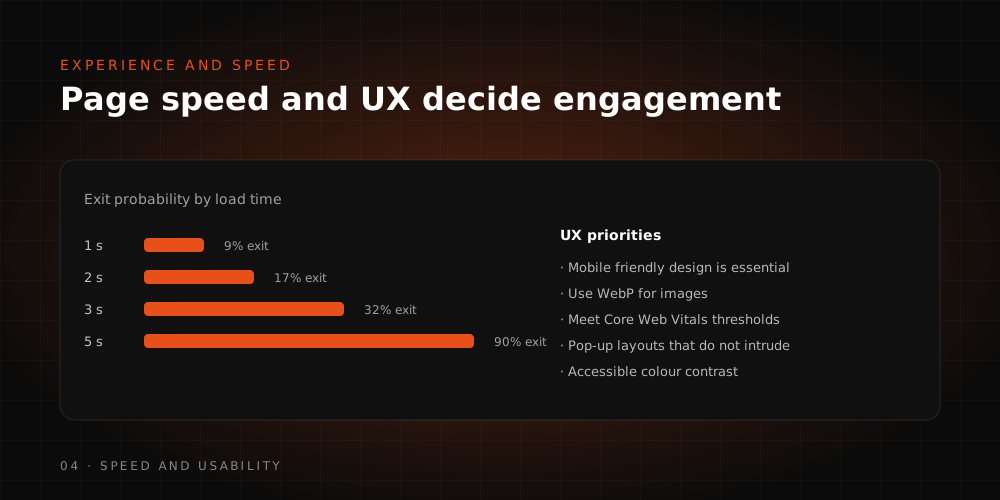
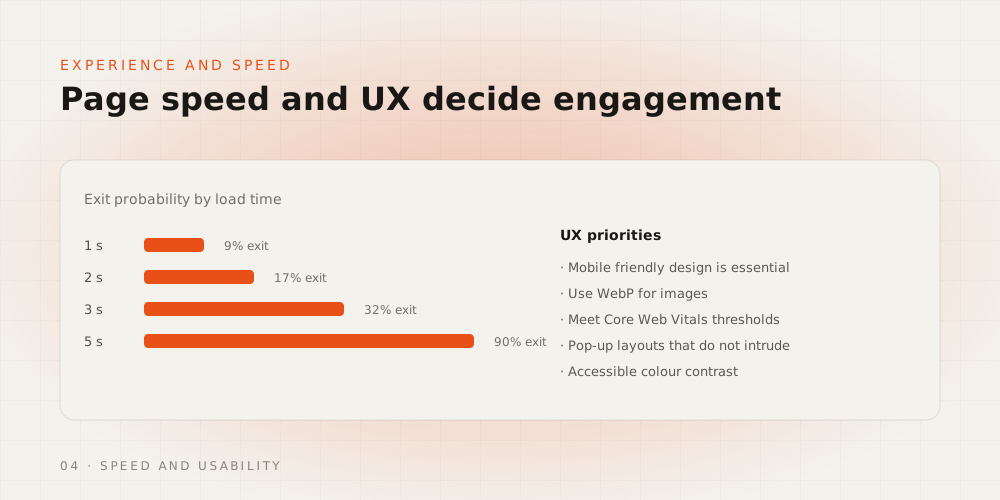
Speed is the single strongest technical factor behind time on site. Google's user experience metrics come down to three measurements, reported from real user data rather than lab tests alone.
- LCP (Largest Contentful Paint): When the largest visual element on the page appears, usually the hero image or the headline block.
- INP (Interaction to Next Paint): How quickly the page responds to a user interaction. It replaced FID in 2024 and reflects real interaction delay far more honestly.
- CLS (Cumulative Layout Shift): How much content moves while the page loads. Late-loading ads and images push it up, users tap the wrong element, and they leave.
Three fixes deliver results fastest in practice: serving images in modern formats at the right dimensions, reserving fixed height for image and ad slots, and deferring third-party scripts. Each one is measurable on its own, which matters when you need to prove what worked.
How many ads and interruptions are acceptable?
Ads and pop-ups damage retention in proportion to how much they block access to content. Google's guidance on intrusive interstitials explicitly treats full-screen layers that cover the main content immediately after a user arrives from search as a poor experience. Legally required notices such as cookie consent and age verification sit outside that scope.
The practical rule: keep the main content visible on the first screen, trigger pop-ups only after the user signals intent, and size the close button so it can be tapped comfortably on mobile. For the copy and placement of the offers inside those layers, see our guides on writing effective CTAs and optimising CTA buttons.
How does content structure keep people reading?
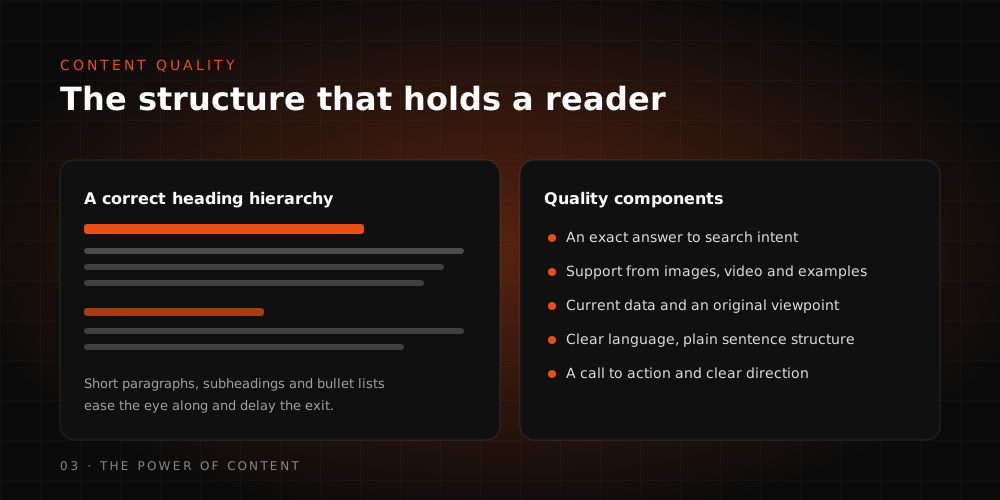
Users scan before they read. If the scan produces no evidence that the answer is on the page, they leave. Structure therefore comes before style.
- Open with the answer. The first sentence of every section should answer that heading's question in a way that reads correctly out of context. This works for readers and for citability in AI-generated answers alike.
- Keep the heading hierarchy intact. H2 for sections, H3 for subsections. A scattered hierarchy breaks both in-page navigation and reading order.
- Use lists and tables only for genuine comparisons. Decorative lists do not aid scanning; they just make the page longer.
- Use images and video where they carry information. Video players that are not lazy-loaded damage speed metrics and give back the time they earned.
- Update old content. Dead product names, discontinued services and obsolete interface steps destroy trust in the first paragraph.
Getting the audience definition right comes first; we covered it in how to define your target audience. For production workflow, see how to create content with AI.
How should internal links and navigation work?
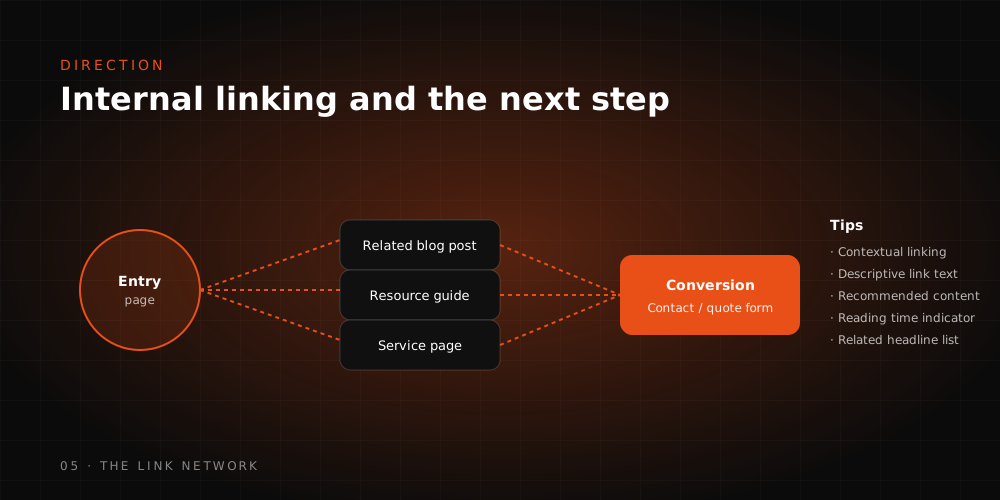
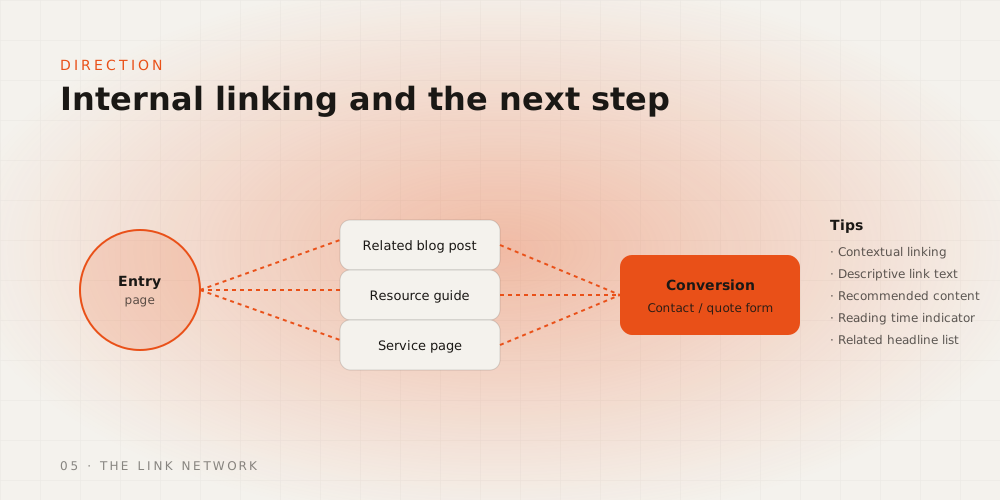
An internal link works when it offers the logical next step. Generic "latest posts" blocks bolted to the page footer go unclicked because they carry no relevance. Effective linking comes down to three placements.
- In-context links: Point readers to the detail they need at that exact sentence, with descriptive anchor text. Never "click here"; say what the destination is.
- Topic cluster links: When articles on the same subject connect to each other, readers reach a second and third page and search engines see the topical authority more clearly.
- Conversion path links: Leave one clear route from the content to the relevant service or product page.
The navigation rule is simple: users must be able to see where they are, where they came from and where they can go next. In e-commerce, if filtering and sorting do not open with a single tap on mobile, users get lost on listing pages. Understanding how people phrase their queries in the first place helps here, and we covered that in what is a search engine.
What are the most common mistakes?
Most teams trying to improve retention keep producing content without fixing measurement first. These are the errors we see most often.
- Reading a single metric in isolation. If engagement rate rises while conversions fall, that is a shift in traffic quality, not a win.
- Deciding from averages. An average with no breakdown by device, channel and template hides the real problem, which is usually on mobile.
- Repeating a keyword through the text in the name of SEO. Repetition breaks the reading flow and loses the visitor early.
- Validating speed work with lab tests only. Decisions belong to real user data.
- Shipping every change at once. When design, content and ad layout move together, nothing can be attributed.
How Webtures approaches it
Webtures starts retention work with a measurement audit. The GA4 event schema and conversion definitions are verified first, then engagement rate and Core Web Vitals data are broken out by template. Once the weak templates are identified, speed, content structure and internal linking are handled separately, and every change is measured under controlled conditions. Across 16 years of digital marketing work, the pattern is consistent: design changes made before measurement is fixed may improve things, but they never stick, because nobody can prove they worked.
For a programme that treats engagement and speed metrics as one problem, talk to our team in Istanbul and London.