What Is Google Ads (AdWords) and How Do You Use It?
Learn what Google Ads (formerly AdWords) is, how to build campaigns for your target audience, and how to use Keyword Planner to find profitable keywords.



Google Ads is Google's advertising platform, running placements across search results, YouTube, Gmail, Discover, Maps, and a network of partner sites. It is straightforward to set up and opens into a very different level of depth in expert hands. The platform was called AdWords until 2018; the correct name today is Google Ads, and the interface, campaign types, and bidding logic have all changed substantially since then.
With Google Ads, website owners can appear on the searches they target and turn user interest into measurable conversions quickly. The difference from search engine optimization is speed and control: visibility starts the day you open the budget and stops when you close it.
How does Google Ads work?


Google Ads runs a real-time auction for every search. Your bid alone does not decide whether your ad shows or where it ranks. The main components are:
- Bid: the maximum you are willing to pay for a click.
- Ad quality: how closely the ad and landing page match search intent, plus expected click-through rate and page experience.
- Ad assets: the expected impact of sitelinks, descriptions, call details, prices, and other extensions.
- Search context: the user's location, device, time of day, and the nature of the query.
This structure means a well-built ad on a modest bid can outrank a weak ad on a high one. Budget efficiency therefore depends heavily on the quality of the ad and the landing page behind it.
What are the Google Ads campaign types?


Google Ads is built around six main campaign types today, each serving a different stage of demand.
| Campaign type | Where it runs | What it is used for |
|---|---|---|
| Search | Google search results | Capturing existing demand on high-intent queries |
| Performance Max | Search, Shopping, YouTube, Discover, Gmail, Display, Maps | Managing all inventory from a single goal with automation |
| Demand Gen | YouTube, Discover, Gmail | Creating demand with visual and video formats before the search happens |
| Shopping | Search results and the Shopping tab | E-commerce sales with product image and price |
| Video | YouTube | Reach, brand awareness, and view-based objectives |
| App | Search, Play, YouTube, Display | Mobile app installs and in-app actions |
Performance Max replaced the older Smart Shopping and Local campaigns. Demand Gen is the successor to Discovery campaigns. On the search network, responsive search ads are the standard format today, and the older fixed-structure text ad format has been retired.
How do you advertise with Google Ads?


Advertising with Google Ads is a planning exercise that begins before the account is opened. A sound setup follows this order:
- Define the goal. A sale, a form, a phone call, or an app install. No campaign type should be chosen before the goal is clear.
- Set up measurement. Conversion tags, the GA4 link, and conversion values must all work from day one.
- Describe the audience. Alongside age, location, interest, and intent signals, bring in your own customer lists.
- Prepare keywords and assets. A keyword set on the search side; headlines, descriptions, images, and video variety on the visual side.
- Prepare the landing page. If the page does not deliver on the promise in the ad, both quality score and conversion rate suffer. CTA button optimization is usually the fastest lever here.
- Choose the bidding strategy. Move to target CPA or target ROAS once enough conversion data has accumulated.
- Measure and narrow. Search terms reports, exclusions, and asset performance need regular review.
For the targeting layer, how to define your target audience and how to keep visitors on your site pick up where this guide leaves off.
A concrete example: say you run an e-commerce site selling gift items. Your products are not necessities; people buy them for others. Your primary audience is therefore young and middle-aged shoppers who buy gifts for each other and are comfortable online. You work out what that audience searches for, build the search campaign on those terms, and feed visual demand through Demand Gen.
How do you use Keyword Planner?


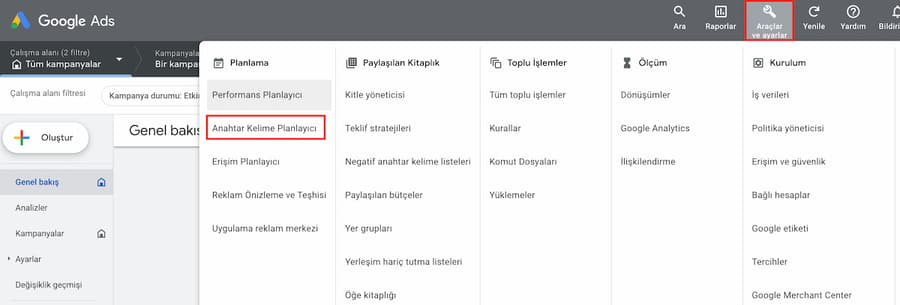
Keyword Planner is the free tool inside your Google Ads account for keyword research and performance forecasting. You reach it from the Tools section of the account. The images below show how the tool works; because the interface is updated over time, menu names may look different from the screenshots while the flow stays the same.
The tool has two sections. The "discover new keywords" section on the left generates a broad list of suggestions around a seed keyword, which is how you find the terms your audience searches for but you had not thought of.
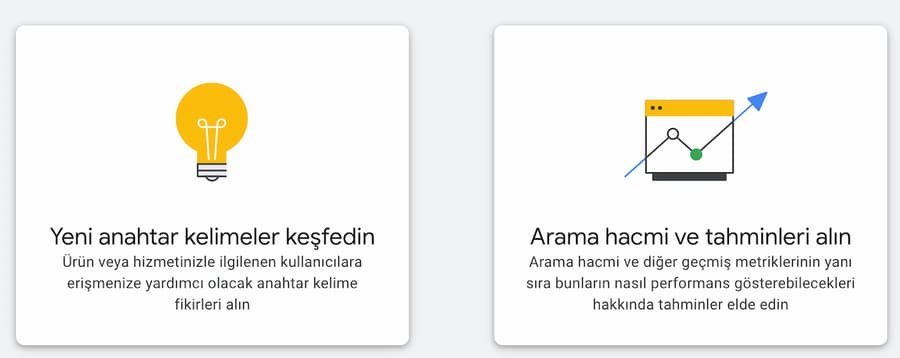
The section on the right lets you upload keywords in bulk and receive click, cost, and conversion forecasts for them. Budget planning is built on the estimates produced here.
What to watch when choosing keywords
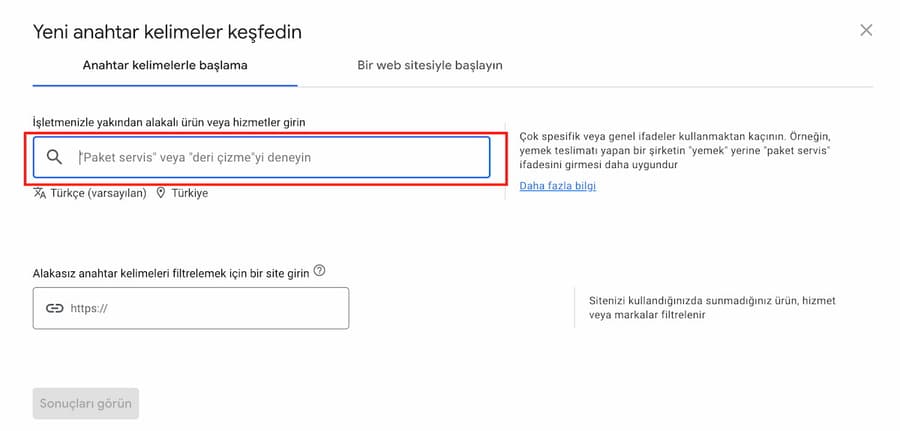
You need to give the tool at least one or two seed keywords. Terms that are too broad scatter the suggestions; terms that are too narrow starve the list. A car dealership entering only "car" will struggle to get targeted results, whereas "car sales" returns the keywords its audience actually searches for.
Accounts with no active spend see search volumes reported in broad ranges. Precise volume data requires a live account. For that reason, do not limit keyword research to this tool alone; search terms reports, Search Console data, and on-site search logs often give a sharper signal.
How do you set a Google Ads budget?
Your budget comes from the number of conversions you want multiplied by your target cost per acquisition. There is no universally correct budget; what matters is what a conversion costs you and how much profit it returns. A small personal site and a brand spending millions can run on the same platform, because the system respects the daily budget limit you set.
For new accounts the practical approach is this: start with a budget large enough to produce the conversion volume a bidding strategy needs to finish learning, watch data quality rather than cost in the first weeks, and only move to optimization once meaningful conversion volume has built up.
What does a Google Ads specialist do?
A Google Ads specialist is responsible for turning ad budget into conversions. The role goes well beyond building campaigns: appearing on the right keywords, reaching the right audience, optimizing cost per click, keeping the measurement layer sound, and cleaning the account regularly are all part of it. Because Google Ads publishes strictly in exchange for money, incomplete or flawed setups translate directly into financial loss.
People who do this work are called performance marketing specialists or Google Ads specialists. Webtures has managed performance marketing accounts for enterprise brands for 16 years from Istanbul and London. If you would like us to review how your account is structured, get in touch with our team.