Table of contents and GEO
Learn how a table of contents improves GEO visibility, helps AI search systems parse your heading structure, and gives readers a faster path to answers.


There are many strategies you can follow to increase GEO visibility and deliver a better user experience. One of them is the table of contents, a structure that strengthens user experience while helping AI-powered search systems understand your content more clearly.
In this article
- What is a table of contents?
- What does a table of contents do?
- How should a table of contents be used?
- How to build a table of contents
- WordPress table of contents plugins
- What to watch out for when using a table of contents
- Emoji-enhanced search results with a table of contents
What is a table of contents?
A table of contents is a list of the section headings on your web page. When you add one, the headings (H tags) in your content are listed hierarchically, so users can jump straight to the section they are looking for. Once the fundamental structural gaps in on-page GEO compliance are resolved, a table of contents is one of the recommended structures for refreshing your content, clarifying your heading hierarchy, and delivering a better user experience.
What does a table of contents do?
A table of contents lets readers navigate directly to the section they need, which strengthens the user experience. It also helps search engines and AI-powered answer systems understand your heading structure, place page sections in the right context, and generate sitelinks in search results.
How should a table of contents be used?
Placement is critical if you want a table of contents to work. Put it at the very bottom of the page and users cannot find what they need quickly; put it at the very top and readers may bounce before they get any sense of the content itself. We recommend placing the table of contents right after the first paragraph or the first subheading.
How to build a table of contents
To add a table of contents to your web page, first assign an id value to each of your H headings. Then create a single-column table listing those headings and place it right after the first paragraph of the page. In the table, link each heading label to the id value you assigned to the corresponding H heading.
To illustrate with a live example, the heading text below has been assigned the id value #baslik2 and linked accordingly. What does a table of contents do?
WordPress table of contents plugins
On WordPress, a table of contents is easy to set up with plugins. Free plugins let you add a table of contents to your pages and posts, and most of them include options for customizing how it looks.
WordPress table of contents plugins:
- Easy Table of Contents
- LuckyWP Table of Contents
- Table of Contents Plus
- SimpleTOC – Table of Contents Block
If you use Elementor on WordPress, the Elementor panel also ships with a table of contents widget, and it will serve you perfectly well.
What to watch out for when using a table of contents
Used correctly, a table of contents benefits both your GEO visibility and your user experience. Used carelessly, it may deliver no benefit at all.
Points to watch when using a table of contents:
- The content should have at least two subheadings
- If there are many subheadings, the table should load collapsed by default
- The position of the table of contents should be chosen carefully
- Each entry in the table should link to the correct heading
- Heading lengths within the content should be kept sensible
Emoji-enhanced search results with a table of contents
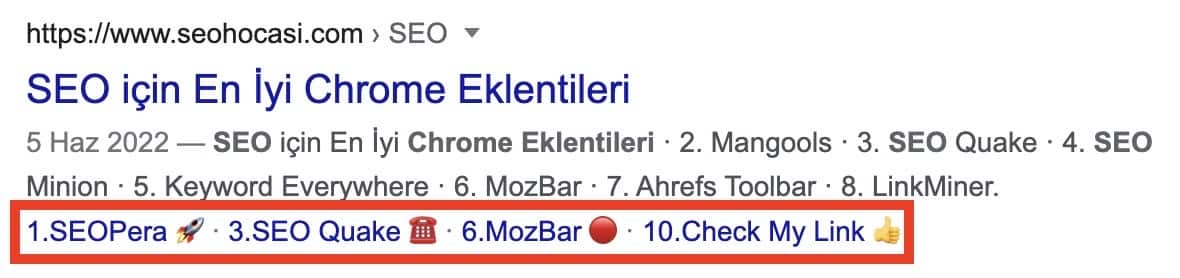
Emojis appearing in search results can contribute to higher click-through rates and stronger page visibility. If you use your table of contents correctly, the emojis in your headings can show up in search results.
The easiest way to do this is to add emojis to the headings of a page that already earns sitelinks on Google.
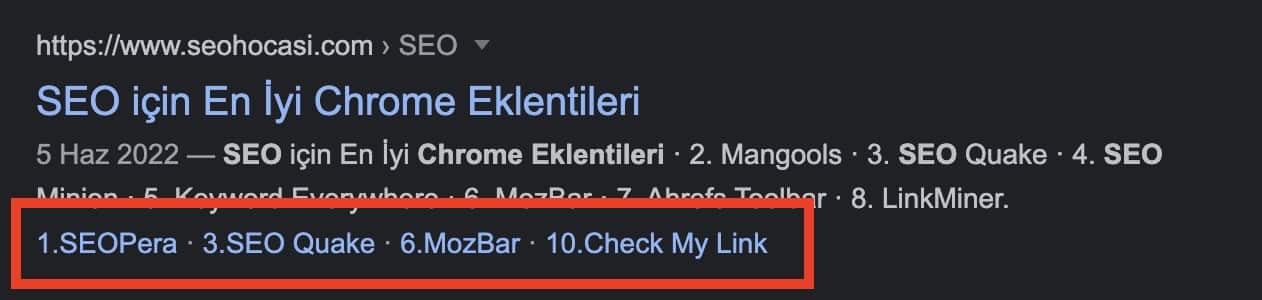
As in the image above, if your sitelinks already appear in search results and those links come from your table of contents, all you need to do is add emojis to the headings. Once you do, the result looks like the example below.

If your sitelinks do not yet appear in search results, you can still surface emojis there by adding them to your headings and backing the page with a small amount of link support.

Let us make your brand visible in AI search.
Share your goals, we'll come back with a custom growth plan within one business day. A strategy lead will reach out personally.
Get in touch